
HCMToGo
Workforce ReadyBusiness
3.64.28K Reviews
- Version
- 1.106.5
- Installs
- 1.00M
- Age Rating
- Everyone
Screenshots
Our Review of HCMToGo
 Analysis by Appyee
When work depends on accurate schedules, time records, and employee information, the hardest part is often not the task itself but finding the right place to complete it. HCMToGo is built for that everyday business problem. Developed by Workforce Ready, it is a free business app that gives people a mobile way to interact with their human capital management system. I see it as a practical companion for employees and managers who need to deal with work-related information while away from a desk.
The app is described as a modern version of the TotalHRWorks Mobile App, so its role is clear: it brings an existing workplace process onto a phone rather than trying to become a general-purpose productivity tool. That distinction matters. This is not an app I would install for personal budgeting, project planning, or informal team chat. Its value depends on whether an employer uses the connected Workforce Ready environment and has enabled the relevant functions for its staff.
In my experience, that makes the first question simple: is your workplace already using Workforce Ready? If the answer is no, the download alone will not turn HCMToGo into a useful standalone employee-management app. If the answer is yes, it can reduce the number of times you need to open a desktop browser for routine work tasks.
From a work request to a completed task
I find the most useful way to think about a work request is to separate spotting the issue from getting it resolved. A mobile check can help me gather the right details while they are fresh, but the next step may still depend on a manager or administrator. That distinction sets up a closer look at how a request moves through the workplace process.
Starting with the situation employees actually face
Imagine finishing a shift and realizing that your recorded hours need checking, or needing to look at work information before leaving home. The usual alternative is to wait until you reach a computer, ask a supervisor to check it, or search through an employer portal that is awkward on a small screen. HCMToGo addresses that gap by putting the mobile part of the process in one place.
The app is aimed at a broad business audience rather than a narrow profession. An employee may use it as a quick checkpoint during the day, while a manager may use it as part of a larger approval or staffing routine. The exact experience will depend on the organization’s setup, but the general benefit is consistent: mobile access can shorten the distance between noticing a work issue and taking the next action.
I would especially consider it useful for people who work across locations, spend much of the day away from a desk, or need to keep an eye on employment-related details outside standard office hours. For a desk-based worker with a reliable desktop portal and very few changes to make, the phone version may feel less important. It is most convincing when mobility is part of the problem.
Getting ready before the first useful session
The first step is not simply installing the app. Your employer’s account, sign-in details, and access configuration determine whether the app can connect you to the right workplace environment. That means a failed first attempt may not be an app defect at all; it may be an account, organization, or setup issue that needs attention from an administrator.
For that reason, I would install it before an urgent deadline rather than minutes before a shift begins. Test the sign-in process when you have time to contact the person responsible for workplace systems. This is one of the less obvious practical lessons with business apps: mobile convenience only works after the handoff between the employee and the organization has been completed.
It is also worth keeping expectations realistic. HCMToGo is free to download, but that does not mean every workplace function is automatically available to every user. What appears on your account is shaped by the employer’s configuration and your role. A manager and a part-time employee should not assume they will see the same workflow simply because they use the same application.
Moving through a routine task
Once access is working, I would treat the app as a place to complete small, clearly defined actions rather than as a full replacement for every human resources conversation. A sensible routine is to open the app, review the information relevant to the current task, make the permitted change or submission, and then check that the action has moved forward.
That last check is important. In a workplace system, pressing a button is not always the same as finishing the process. A request may need review, a time record may need approval, or an update may need to pass to another person. The useful habit is to distinguish between submitted, approved, and completed. HCMToGo can be part of that chain, but it does not remove the organizational steps that follow.
For example, I might review a work record before asking a supervisor to correct it. Instead of sending a vague message such as “my hours look wrong,” I can first identify the relevant entry and explain what needs checking. That makes the later handoff clearer and reduces back-and-forth. The app’s real advantage here is not just access; it is giving the employee a better starting point for a conversation.
Handling the handoff to a manager or administrator
Business software becomes valuable when information moves cleanly between people. An employee may enter or review something, a manager may need to verify it, and an administrator may be responsible for the final record. HCMToGo sits inside that chain, so its usefulness depends on more than the screen in front of the employee.
I would avoid assuming that a mobile submission has immediate effect. If something is time-sensitive, check the status and follow the organization’s normal escalation route rather than relying on the app alone. A phone interface can make an action easy to send, but it cannot guarantee that the next person has reviewed it.
This is also where role differences become significant. A manager who expects to handle approvals from a phone may appreciate the convenience, while an employee may mainly value visibility into personal work information. The same app can therefore feel powerful to one person and limited to another. The difference is not necessarily inconsistent design; it reflects the permissions and responsibilities attached to each workplace account.
A useful workflow tip is to keep the app for the transaction and use the organization’s established communication channel for context when needed. If a record needs explanation, a short, specific message to the appropriate person is often more effective than repeatedly resubmitting the same item. This separation keeps the mobile task focused while preserving the human judgment that workplace records sometimes require.
Reaching the result
The best outcome is not merely having an app on the phone. It is being able to notice a work-related issue, check the relevant information, take the allowed action, and understand what happens next without waiting for a desktop session. That can be a meaningful improvement for employees whose schedules do not line up neatly with office hours.
In a realistic everyday scenario, I might be away from a desk, review a work-related entry, identify a discrepancy, and send the appropriate request while the details are still fresh. A manager could then review the item through the connected system and move it along according to the company’s process. The benefit is a shorter path from discovery to resolution, even though the final decision may still belong to another person.
That workflow also encourages better personal record-keeping. Checking information close to the time it is created makes mistakes easier to spot than waiting until the end of a pay period or administrative cycle. I would not treat the app as a substitute for keeping important personal notes, but I would use it as a prompt to review work information regularly instead of only reacting when something goes wrong.
The app’s broad adoption suggests that this mobile approach is useful to many organizations. It has more than a million installs, an average rating of 3.6 from around eleven thousand ratings, and roughly four thousand three hundred written reviews. Those figures point to a product that serves a substantial audience while also showing that the experience is not universally smooth. I would read that combination as a reason to judge it by your employer’s setup and your daily workflow, not by popularity alone.
Where the flow becomes frustrating
The biggest possible break occurs before the first task: access. If your employer has not configured the service for you, or if your account details are not ready, the app cannot solve that problem independently. This is a common limitation of organization-linked software, but it is especially important here because a person may mistake a setup issue for a poor mobile experience.
Another point of friction is the difference between a quick mobile action and a complete administrative process. A phone is excellent for checking something or starting a straightforward request. It is less comfortable for lengthy explanations, detailed record investigation, or work that requires comparing several pieces of information at once. When the task becomes investigative, I would rather use the fuller workplace interface if it is available.
Small-screen work can also encourage rushed decisions. A compact display makes it easier to tap through a routine flow and harder to absorb a complicated record. My practical rule would be to use the app for speed when the information is familiar, but slow down and verify every detail when an entry affects attendance, scheduling, or another important employment record.
There is a second handoff problem: the app may show that an action has been sent, while the person responsible for reviewing it still needs time to respond. Users who expect instant resolution may therefore feel disappointed even when the mobile submission worked correctly. Understanding the difference between transmission and approval prevents a lot of unnecessary frustration.
The average rating reflects that mixed reality. A 3.6 average is neither a warning to avoid the app automatically nor proof that it will fit everyone perfectly. For me, it suggests a serviceable tool whose success depends heavily on reliability, account configuration, and the quality of the organization’s own process. The app can make access easier, but it cannot repair unclear workplace rules or slow approvals.
Who should use it, and who should look elsewhere
I would recommend trying HCMToGo if your employer already relies on Workforce Ready and you regularly need mobile access to work-related information. It makes the most sense for employees who move between sites, managers who need to handle routine actions away from a computer, and anyone who wants to catch record issues before they become larger administrative problems.
I would be more cautious if you are looking for a universal human resources app that works without an employer connection. That is not the role I see here. I would also skip it as a personal productivity download if your needs are task lists, private scheduling, expense tracking, or team messaging. A dedicated app in each of those categories would be a better match.
Compared with a traditional desktop employee portal, the mobile version wins on immediacy and convenience. Compared with email, it offers a more structured path for workplace actions, which can make the record easier to follow. Compared with contacting a manager directly, it may provide a cleaner starting point for routine requests, but it does not replace the manager when judgment, explanation, or an exception is involved.
That trade-off is central to my opinion. HCMToGo is not most useful because it eliminates people from the process. It is useful because it can make the employee’s part of the process more direct and visible. If your workplace has a well-organized system behind it, that distinction works in the app’s favor. If the surrounding process is confusing, the phone interface may simply make the confusion more accessible.
Practical details before installing
The app is free and rated for Everyone, which makes it easy for an organization’s staff to try without a purchase decision. It was released on March 27, 2018, and the current version is 1.106.5. Devices need iOS 11 or newer, so anyone using an older Apple device should check compatibility before planning around it.
I would also make the first session a controlled test. Sign in, confirm that the workplace context looks correct, locate the information you expect to use, and complete a low-risk check before relying on the app for something urgent. If the account does not appear as expected, contact the workplace administrator with a clear description of the problem rather than repeatedly reinstalling the application.
For regular use, I would create a simple personal routine: check important entries at a sensible time, record any discrepancy while the details are fresh, submit only the action you understand, and verify its status afterward. This approach gets more value from the app than opening it only when a deadline has already passed.
My overall experience
After looking at HCMToGo as part of a complete work process, I see it as a focused mobile doorway into an employer’s human capital system. Its strongest point is convenience at the beginning of a task: checking information, starting a routine action, and keeping work moving when a computer is not nearby. Its weakest point is that the app cannot control the account setup, approval chain, or organizational response that determines whether the task truly ends well.
Workforce Ready has positioned this as a modern successor to the TotalHRWorks Mobile App, and that gives the product a practical identity rather than a flashy one. I would recommend it to someone whose employer already uses the connected service and who wants a more immediate way to handle everyday work administration. I would not recommend downloading it with the expectation that it will function independently.
My final advice is to judge HCMToGo by the complete handoff, not just the first tap. If you can move from checking a record to submitting the right action and seeing what happens next, it can save time and reduce avoidable delays. If your work requires detailed investigation, broad reporting, or constant clarification, the desktop system and direct support from your organization may still be the better route. Used for the tasks it handles well, this free business app is a sensible mobile companion rather than a replacement for the whole workplace process.
Verdict
Strengths of HCMToGo
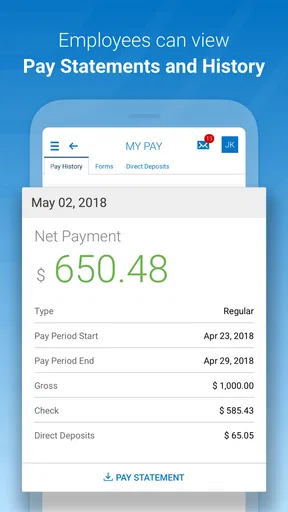
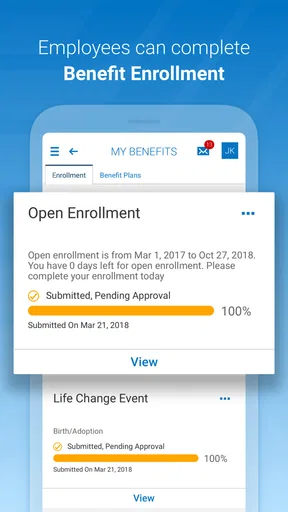
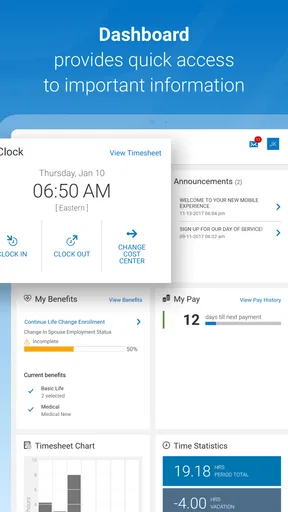
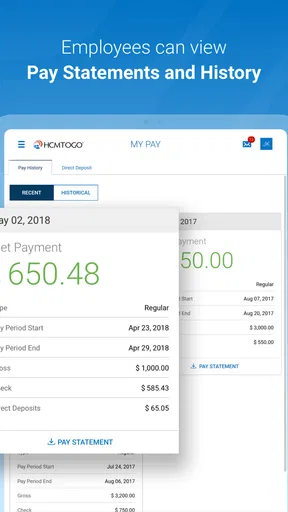
- Quick access to schedules, pay slips, benefits, and HR information.
- Useful push notifications for approvals, reminders, and company updates.
- Mobile time tracking can be convenient for employees working away from a desk.
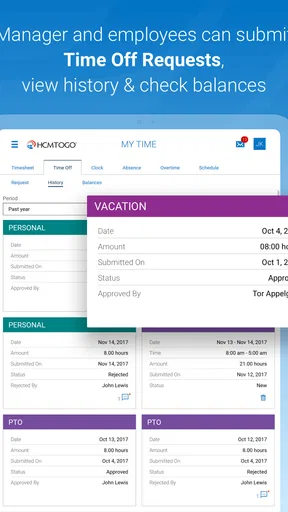
- Supports self-service requests without needing to contact HR for every task.
- Secure login options help protect sensitive employee and payroll information.
Limitations of HCMToGo
- Some features may be unavailable if the employer has not enabled them.
- Performance and available data depend heavily on the company’s HCM setup.
- Initial login may require employer-provided credentials or activation steps.
- The interface can feel complex when navigating multiple HR modules.
- Certain actions may work better on the desktop version than in the app.
Similar Picks in This Category
View All
LinkedIn: Community & Network
LinkedIn3.8

Zoom Workplace
zoom.com4.1

Microsoft Teams
Microsoft Corporation4.6

Meta Business Suite
Meta Platforms, Inc.4.6

Webex Meetings
Cisco Systems, Inc.4.5

TeamViewer Remote Control
TeamViewer4.4
Frequently Asked Questions
What is HCMToGo, and what can I use it for?
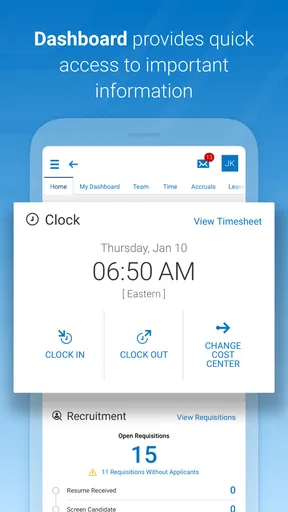
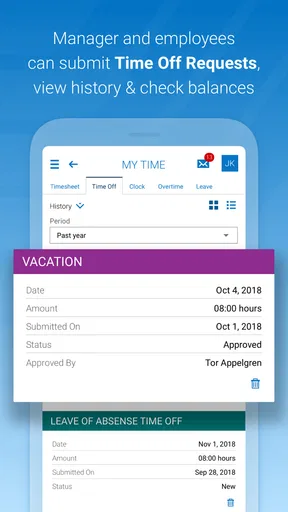
HCMToGo is a mobile employee self-service app designed to help workers access workplace information from their smartphones. Depending on how an organization has configured the platform, you may be able to view schedules, clock in and out, submit time-off requests, check pay statements, review benefits, update personal details, and receive company notifications. The exact tools available can differ between employers.
Can anyone download and use HCMToGo, or do I need an employer account?
Downloading HCMToGo is generally available through the Android and iOS app stores, but using its features normally requires an account connected to an organization that uses the HCM platform. Your employer or HR department typically provides the company access details, login instructions, or an activation process. Installing the app alone will not usually create an account or grant access to employee information.
How do I log in to HCMToGo if I forget my password or have trouble accessing my account?
If you cannot sign in, first check that you are using the correct company identifier, username, and password, since some organizations require an additional employer code or specific login address. Use the password-reset option if it is available, and follow the instructions sent to your registered email address or phone. For locked accounts, missing credentials, or authentication problems, contact your employer’s HR or payroll administrator.
Does HCMToGo support mobile time tracking and location services?
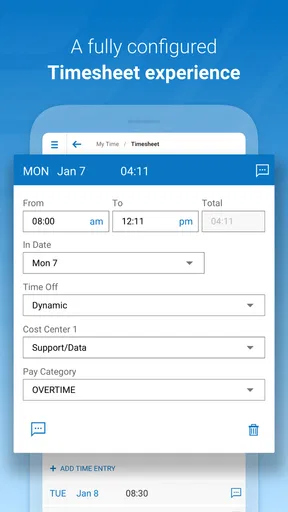
Many organizations use HCMToGo for mobile time tracking, including clocking in and out, viewing worked hours, and submitting timesheets. Whether these options appear depends on your employer’s settings and workplace policies. Some companies may also enable location services, geofencing, or device permissions to verify where a clock-in occurs. Review the permissions shown by the app and ask your employer how location data is handled.
Is HCMToGo safe to use for payroll, personal, and employee information?
HCMToGo is intended to provide secure access to sensitive workplace information, such as payroll details, schedules, benefits, and personal records. However, your security also depends on how you use the app. Keep the application updated, use a strong unique password, enable device security, avoid signing in on shared phones, and log out when appropriate. If your phone is lost or you notice unusual activity, contact your employer promptly.
